Submission to final approval
Full Track & Trace
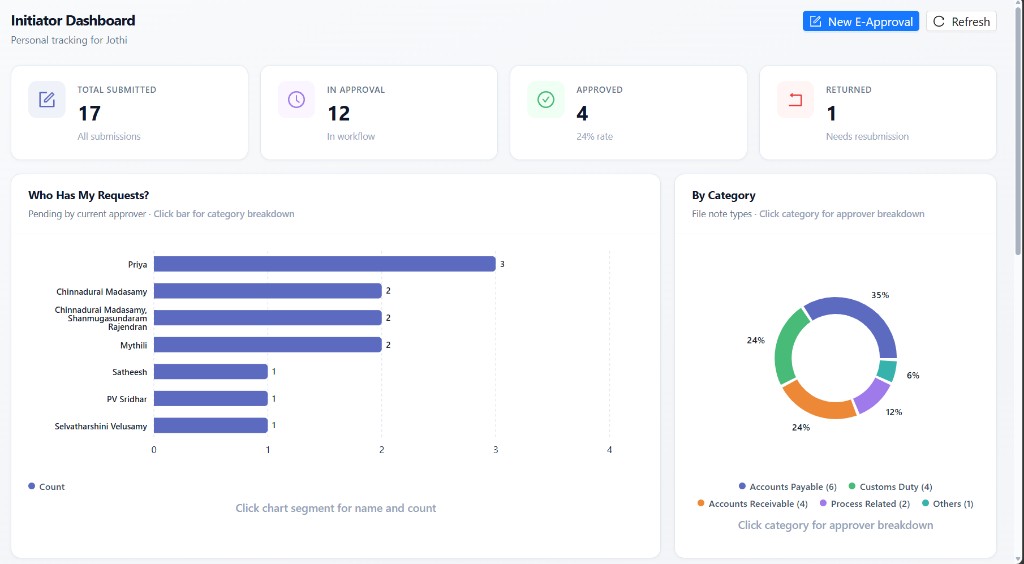
Track every file note from submission to final approval with activity history, current approver, and sequence numbers. Full visibility into who did what and when.

Eliminate email-chain approvals, enforce RCA/CAPA discipline, track SLA in real time, and close every file note with a verified e-approval certificate — from initiator to CFO.
↓ 75%
Approval cycle time
100%
Audit trail coverage
1-click
Magic-link review from email
SLA-aware
Role dashboards & queues
Experience Workflow
Submitted · In approval · Approved · Returned
Purpose-built interfaces for initiators, managers, HoDs, finance, and CFO — from file-note submission to verified PDF without leaving the flow.
E-Approval Stack
Capture, route, govern, notify, and certify — in one unified e-approval stack. No spreadsheet trails. No lost inbox decisions.
Structured Intake
Capture operating unit, department, category, subcategory, issue description, RCA, CAPA, and multi-file attachments in a guided form.
Category Routes
Every subcategory carries a configured approval chain and SLA timeline. Routes are snapshotted at submit so every request keeps its intended path and target days.
Inbox to Decision
Approvers act from secure email magic links or role queues. Returns and rejects require remarks. Finance Controllers choose escalate to CFO or close at Controllership.
Track & Certify
Role dashboards, approval queues, and enterprise history show who holds the request. Approved notes issue an E-Approval Verified PDF with routing audit.
Why Workflow
Purpose-built for enterprise file-note governance. Goes beyond simple approve/reject tools to deliver controlled sequential routes, finance policy paths, and audit-ready certificates.
Faster
Email chains become gated queues with SLA targets — days become hours when every handoff is explicit.
Finance
Controllers open to verifiers, then decide escalate vs close — policy/SOX cases go to CFO only when needed.
1-click
Stakeholders decide from secure token links — Review & Decide without hunting for the portal.
Audit
Full history plus E-Approval Verified PDF for approved notes — who acted, when, and why.
Challenges & Solutions
Control, finance, and operations teams face the same file-note hurdles. Here is how Workflow eliminates them.
Email-chain approvals
File notes bounce across inboxes with no owner, SLA, or next step.
Missing RCA / CAPA discipline
Approvals happen without structured root cause or corrective action.
Opaque finance escalation
Teams don't know when Controllership vs CFO should decide.
No end-to-end visibility
Leadership can't see bottlenecks, breaches, or rework by department.
Sequential gated workflow
RM → HoD → (Finance path) → CFO with enforced stages and remarks.
Guided intake with RCA/CAPA
Required fields and category routes make every note governance-ready.
Configurable finance path
Dual FC gates, multi-verifier consensus, escalate or close without CFO.
Visual board & SLA analytics
Pending by stage, breaches, finance pipeline, RCA/Pareto for continuous improvement.
Capabilities
Track every file note from submission to final approval with activity history, current approver, and sequence numbers. Full visibility into who did what and when.
File-note categories carry subcategory routes and SLA days. Live banners show the required chain at create and review time.
Dedicated dashboards with pending queues, SLA urgency, and drill-down history for every stakeholder in the lifecycle.
Unique access tokens per stakeholder role and email. CTAs in HTML notifications keep governance fast without weakening controls.
Approval Flow
From file-note creation to verified PDF — track every gate with live movement from initiator to final approval.
Step 01
Initiator completes classification, issue details, RCA, CAPA, attachments, and routing contacts.
Gate progress
Standard path (no Finance): Submit → Reporting Manager → HoD → CFO → Closure / PDF
Benefits by Role
Every stakeholder in the file-note lifecycle benefits from Workflow controls.
Clear form guidance, live approval chain + SLA, request tracking, return/resubmit without losing history, and signed PDF on approval.
Dedicated queue with SLA urgency, one-click review, approve or return with reason, and visibility into team workload by initiator.
Department-scoped pending work, approval efficiency KPIs, and controlled handoff into finance or CFO final path.
Policy-aware finance path — open to verifiers, consensus review, then escalate to CFO or close at Controllership with full remarks trail.
Final-stage queue focused on escalated and standard non-finance completions — decide once, with full context and activity history.
Workflow Visual Board with executive summary, bottleneck monitoring, department performance, financial governance, and RCA/CAPA analytics.
Comparison
See how Workflow transforms every step of the file-note approval lifecycle.
7/7 steps transformed
Manual
Intake
Workflow
Intake
Click any step to preview the transformation
FAQ
Yes. The live chain enforces Initiator → Reporting Manager → HoD → (optional Finance Controller → Finance Verifiers → Finance Controller review) → CFO, with only the current gate holder able to act.
Yes, when Finance is involved. After verifier consensus, the Finance Controller can Forward to CFO or Close Without CFO for standard Controllership closures.
No. Stakeholders receive secure token links by email to Review & Decide or Track Request. Role dashboards and queues remain available for day-to-day work.
Yes on the E-Approval Form. Initiator, issue documentation, classification, and Reporting Manager are required before submit; Others subcategory also requires free-text detail.
Each file-note subcategory carries an SLA timeline (working days). The target and approval chain are shown at create/review time and snapped onto the request at submit for consistent tracking and breach analytics.
Approvers must leave remarks. Status returns to the initiator for Edit & Resubmit. Approver tokens reset while history is preserved; initiator and Reporting Manager emails stay locked on resubmit.
Approved requests can download an E-Approval Verified PDF with initiator details and routing audit. A responsible user is also notified to close the file note.
Administrators use Workflow Registration for user onboarding and the Workflow Visual Board for lookup, volume, SLA, bottleneck, finance governance, and RCA/CAPA analytics.
Deploy Workflow at scale
Transform file-note governance with sequential e-approvals, SLA visibility, finance-grade escalation paths, and verified certificates — built for enterprise controls teams.
Built for governance, finance, and operations stakeholders across multi-site enterprises.
Workflow — Sequential file-note e-approvals with SLA routes, magic-link decisions, finance Controllership gates, and verified PDF certificates.